
Blog
Network Structured Cabling in Kenya: Complete Guide for Offices, CCTV, Wi-Fi & IP Phone Installations
What Is Network Structured Cabling?
Network structured cabling is the organized installation of network cables, patch panels, cabinets, faceplates, trunking, switches, routers, and related accessories used to connect devices within a building or business environment.
It is the physical foundation that allows computers, printers, IP phones, CCTV cameras, access points, servers, and other network devices to communicate reliably.
For businesses in Kenya, a properly installed structured cabling system helps improve internet stability, office productivity, CCTV performance, Wi-Fi coverage, IP phone communication, and future network expansion.
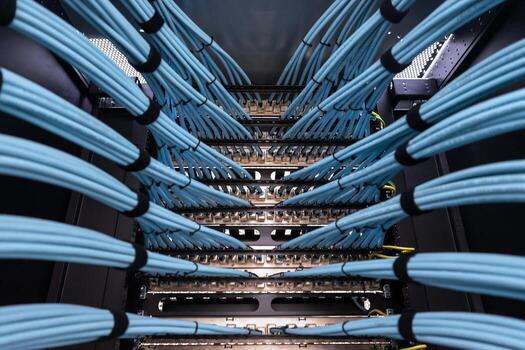
At Almiria Limited, structured cabling is treated as a complete network solution — not just cable installation.
Why Structured Cabling Is Important for Businesses
A well-designed structured cabling system gives your business a clean, reliable, and scalable network.
Key Benefits of Structured Cabling
- Improves network performance and stability
- Reduces downtime caused by poor cabling
- Makes troubleshooting easier
- Supports computers, phones, CCTV, access points, and printers
- Allows future expansion without messy cabling
- Keeps the server room or network cabinet neat
- Supports professional cable labeling and documentation
- Helps businesses separate data, voice, CCTV, and guest Wi-Fi networks
Whether you are setting up a small office, school, hotel, hospital, warehouse, retail shop, or corporate building, structured cabling provides the backbone for your ICT infrastructure.
Typical Structured Cabling Network Setup
A professional structured cabling system normally follows this connection path:
Internet / ISP
   ↓
Router / Firewall
   ↓
Core Switch / PoE Switch
   ↓
Patch Panel
   ↓
Cat6 / Cat6A Network Cable
   ↓
Faceplate / Data Outlet
   ↓
RJ45 Patch Cord
   ↓
Computer / Printer / IP Phone / Access Point / CCTV Camera
This setup ensures that the network is neat, easy to manage, and suitable for both current and future business needs.
Main Components of a Structured Cabling System
A complete structured cabling installation includes both active equipment and passive cabling accessories.
1. Router or Firewall
The router or firewall connects your internal office network to the internet. It also controls traffic between users, devices, servers, branches, or cloud services.
A firewall adds security by controlling access, blocking unwanted traffic, and helping protect the business network.
Common Uses
- Internet sharing
- Network security
- VPN connections
- Bandwidth control
- User access control
- Separating departments or networks
2. Network Switch
A switch distributes network connectivity to users and devices.
Switches can be:
- Unmanaged switches
- Managed switches
- PoE switches
- Core switches
- Access switches
Managed Switch
A managed switch is ideal for business networks because it supports VLANs, monitoring, port control, and better troubleshooting.
PoE Switch
A PoE switch provides both data and power through one network cable.
PoE switches are commonly used for:
- IP CCTV cameras
- Wireless access points
- IP phones
- Access control devices
- Intercoms
3. Patch Panel
A patch panel is where network cables from different office points are terminated inside the cabinet.
Instead of connecting long cables directly to the switch, each cable is properly terminated on a patch panel. Short patch cords are then used to connect the patch panel to the switch.
Benefits of Patch Panels
- Cleaner cabinet setup
- Easier troubleshooting
- Better cable organization
- Easier port labeling
- Professional finish
- Less damage to permanent cables
Patch Panel Connection Example
Switch Port
   ↓
RJ45 Patch Cord
   ↓
Patch Panel Port
   ↓
Cat6 Cable
   ↓
Faceplate
   ↓
User Device
4. Cat6 and Cat6A Network Cable
Cat6 and Cat6A are the most common cables used in modern structured cabling.
Cat6 Cable
Cat6 cable is suitable for most office networks, CCTV systems, IP phones, printers, and Wi-Fi access points.
It is the recommended option for most standard business installations.
Cat6A Cable
Cat6A is recommended for premium installations, high-performance networks, Wi-Fi 6/7 deployments, server rooms, and 10 Gigabit-ready networks.
Cat6 vs Cat6A
| Cable Type | Best For | Typical Use |
|---|---|---|
| Cat6 | Standard business networks | Offices, CCTV, phones, Wi-Fi |
| Cat6A | High-performance networks | 10G, server rooms, premium offices |
5. Keystone Jacks and Faceplates
At the user end, network cables are normally terminated into keystone jacks and faceplates.
Keystone Jack
A keystone jack is the RJ45 module where the cable is terminated.
Faceplate
A faceplate is the wall or trunking outlet where the user connects a patch cord.
Common faceplates include:
- Single data faceplate
- Dual data faceplate
- Four-port faceplate
- Floor box data outlet
- Trunking data module
Example:
Cat6 Cable
   ↓
Keystone Jack
   ↓
Faceplate
   ↓
RJ45 Patch Cord
   ↓
Computer / IP Phone / Printer
6. RJ45 Patch Cords
Patch cords are short network cables used to connect equipment.
There are two common types in structured cabling:
Cabinet Patch Cords
Used to connect the patch panel to the switch.
Patch Panel → Patch Cord → Switch
User Patch Cords
Used to connect the faceplate to the user device.
Faceplate → Patch Cord → Computer / Phone / Printer
A common mistake in quotations is forgetting either cabinet patch cords or user patch cords.
7. Network Cabinet or Rack
A network cabinet houses the router, firewall, switch, patch panel, NVR, PBX, UPS, and other network equipment.
Common Cabinet Sizes
- 4U
- 6U
- 9U
- 12U
- 15U
- 18U
- 22U
- 27U
- 32U
- 42U
Wall-mounted cabinets are ideal for smaller networks, while floor-standing racks are used for larger server rooms and data centers.
Items Commonly Installed in a Cabinet
Router / Firewall
Switch / PoE Switch
Patch Panel
Cable Manager
PDU
UPS
NVR
PBX
Fiber ODF
Cabinet Accessories Often Required
- PDU
- Cable manager
- Fan kit
- Shelf
- Cage nuts and screws
- Brush panel
- Blanking panels
- Earthing kit
- UPS
8. Trunking, Conduit and Cable Tray
Network cables must be protected and routed properly.
Common cable routing options include:
- PVC trunking
- PVC conduit
- Flexible conduit
- Cable tray
- Ceiling voids
- Floor trunking
- Floor boxes
- Raised floors
- Server room ladder trays
The correct routing method depends on the building design, ceiling type, wall finish, number of points, and customer preference.
Structured Cabling for Office Computers
For office users, structured cabling connects computers, printers, scanners, and shared devices to the network.
Office Data Point Connection
Router / Firewall
   ↓
Switch
   ↓
Patch Panel
   ↓
Cat6 Cable
   ↓
Faceplate
   ↓
Patch Cord
   ↓
Computer / Printer
A staff desk may require one or two data points depending on whether the user has a computer, IP phone, printer, or other network device.
Structured Cabling for IP Phones
Modern IP phones use network cabling instead of traditional telephone cabling.
IP Phone Connection
PBX / Router
   ↓
PoE Switch
   ↓
Patch Panel
   ↓
Cat6 Cable
   ↓
Faceplate
   ↓
Patch Cord
   ↓
IP Phone
Some IP phones also allow a computer to connect through the phone.
Faceplate
   ↓
IP Phone
   ↓
Computer
For IP phone installations, it is important to confirm whether the phones will be powered using PoE switches or separate power adapters.
Structured Cabling for CCTV Cameras
IP CCTV cameras commonly use Cat6 cable and PoE switches.
CCTV Network Flow
NVR / Router / Main Network
   ↓
PoE Switch
   ↓
Patch Panel
   ↓
Cat6 Cable
   ↓
IP Camera
For small CCTV installations, cameras may connect directly to a PoE switch. However, for professional corporate, school, hospital, office, warehouse, or estate installations, it is better to use structured cabling with proper labeling, cabinet management, and testing.
CCTV Cabling Items May Include
- Cat6 cable
- PoE switch
- NVR
- IP cameras
- Patch panel
- Cabinet
- UPS
- Trunking or conduit
- RJ45 connectors or keystone jacks
- Surge protection where required
- Testing and labeling
Structured Cabling for Wi-Fi Access Points
Business-grade wireless access points normally require network cabling and PoE power.
Access Point Connection
Router / Firewall
   ↓
PoE Switch
   ↓
Patch Panel
   ↓
Cat6 Cable
   ↓
Access Point
For Wi-Fi projects, structured cabling ensures that access points are properly placed in ceilings, corridors, meeting rooms, halls, hotel areas, classrooms, warehouses, or outdoor zones.
Wi-Fi Cabling Items May Include
- Access points
- PoE switch
- Cat6/Cat6A cable
- Patch panel
- Cabinet
- Controller or cloud key where required
- Installation and configuration
Structured Cabling for Access Control
Access control devices such as biometric readers and controllers may also require network points.
Access Control Network Flow
Router / Switch
   ↓
Cat6 Cable
   ↓
Access Control Controller / Biometric Reader
Access control installations may also require:
- Power supply unit
- Magnetic lock
- Exit button
- Emergency break glass
- Door release cable
- Access control software
- Network point
- UPS
Sales teams should avoid quoting only network cable where electrical and access control accessories are also required.
Structured Cabling for Printers, POS and Shared Devices
Printers, scanners, POS systems, biometric devices, and time attendance machines often need dedicated network points.
Typical Connection
Switch
   ↓
Patch Panel
   ↓
Cat6 Cable
   ↓
Faceplate
   ↓
Patch Cord
   ↓
Printer / POS / Scanner / Biometric Device
Dedicated data points help improve reliability compared to depending only on Wi-Fi.
PoE Explained: Power Over Ethernet
PoE means Power over Ethernet. It allows a network cable to carry both data and power.
Devices That Commonly Use PoE
- IP cameras
- Wireless access points
- IP phones
- Access control devices
- Intercoms
PoE Standards
| Standard | Common Name | Common Use |
|---|---|---|
| 802.3af | PoE | IP phones, basic cameras |
| 802.3at | PoE+ | Access points, better cameras |
| 802.3bt | PoE++ | High-power APs, PTZ cameras, advanced devices |
Important Sales Note
When choosing a PoE switch, do not only look at the number of ports. Also check the total PoE power budget.
For example, a 24-port PoE switch may not power 24 high-power access points or PTZ cameras if the PoE budget is too low.
Maximum Distance for Cat6 Network Cabling
For standard Ethernet cabling, the recommended maximum copper network cable channel length is approximately:
100 meters
This includes the permanent cable run and patch cords.
If the distance is more than 100 meters, fiber optic cable is normally recommended.
Simple Customer Explanation
For normal office points we use Cat6 or Cat6A cable. For long-distance links above 100 meters, or for connecting buildings, we recommend fiber optic cable.
When to Use Fiber Instead of Copper Structured Cabling
Fiber optic cable should be recommended when:
- Distance is above 100 meters
- Connecting two buildings
- Connecting remote warehouses or blocks
- Connecting floors through a backbone
- Electrical interference is high
- High-speed backbone is required
- CCTV or Wi-Fi zones are far from the main cabinet
Fiber Backbone Example
Main Cabinet
   ↓
Core Switch with SFP
   ↓
Fiber Cable
   ↓
Remote Cabinet
   ↓
PoE / Access Switch
   ↓
Cat6 Cabling
   ↓
Users / Cameras / Access Points / IP Phones
Structured Cabling for Multi-Floor Buildings
For large offices or multi-floor buildings, a professional design may include:
- Main cabinet/server room
- Floor cabinets
- Fiber backbone between cabinets
- Cat6/Cat6A cabling from floor cabinets to user points
- Managed switches
- PoE switches
- Patch panels
- UPS backup
- Proper labeling and testing
This design reduces long cable runs and improves network performance.
UTP, FTP, STP and Shielded Cable
Network cables can be shielded or unshielded depending on the environment.
| Cable Type | Meaning | Best Use |
|---|---|---|
| UTP | Unshielded Twisted Pair | Normal office networks |
| FTP | Foiled Twisted Pair | Moderate interference areas |
| STP | Shielded Twisted Pair | Electrical interference areas |
| S/FTP | Shielded and foiled | High-interference or premium installations |
For most office projects, Cat6 UTP is suitable. For factories, industrial areas, lift areas, generator rooms, or areas near heavy electrical cables, shielded cabling may be recommended.
Pure Copper vs CCA Network Cable
Not all network cables are equal.
Pure Copper Cable
Pure copper cable is recommended for professional installations because it provides better performance, better PoE support, and better long-term reliability.
CCA Cable
CCA means Copper Clad Aluminium. It is cheaper but not recommended for serious business installations, especially where PoE is used.
Recommended Position
For business networks, CCTV, access points, and IP phones, use pure copper Cat6 cable for better performance and reliability.
Switch Selection Guide
Choosing the right switch is important in structured cabling projects.
| Requirement | Recommended Switch |
|---|---|
| Basic small network | Unmanaged switch |
| Business network | Managed switch |
| CCTV cameras | PoE switch |
| Access points | PoE switch |
| IP phones | PoE switch |
| VLANs and control | Managed switch |
| Large network | Core switch + access switches |
Switch Size Guide
| Number of Network Points | Recommended Switch Size |
|---|---|
| 1–8 points | 8-port switch |
| 9–16 points | 16-port switch |
| 17–24 points | 24-port switch |
| 25–48 points | 48-port switch |
| Above 48 points | Multiple switches or core/access design |
Always allow spare ports for future expansion.
VLANs and Network Segmentation
For advanced business networks, managed switches can support VLANs.
VLANs can separate:
- Staff network
- Guest Wi-Fi
- CCTV network
- IP phone network
- Server network
- Management network
This improves security, performance, and network control.
Testing, Labeling and Documentation
A professional structured cabling installation should be tested and labeled before handover.
Common Tests
| Test | Purpose |
|---|---|
| Continuity test | Confirms the cable connects end-to-end |
| Wiremap test | Confirms correct pin arrangement |
| Length test | Confirms cable length |
| PoE test | Confirms power delivery |
| Network link test | Confirms device connectivity |
| Certification test | Confirms standards compliance for professional projects |
Labeling Should Cover
- Patch panel ports
- Faceplates
- Switch ports
- CCTV points
- Access point points
- IP phone points
- Cabinet equipment
Example labels:
D01 – Reception Data
D02 – Accounts Office
D03 – Boardroom AP
C01 – Entrance Camera
V01 – Manager IP Phone
Good labeling reduces future troubleshooting time and makes maintenance easier.
Complete Structured Cabling BOQ Checklist
A professional structured cabling quotation may include the following:
Active Equipment
- Router/firewall
- Core switch
- Managed switch
- PoE switch
- Wireless access points
- NVR for CCTV
- PBX/IP phones
- UPS
- Controller or cloud key where required
Cabinet and Rack Items
- Wall-mounted cabinet or floor-standing rack
- PDU
- Cable manager
- Shelf
- Fan kit
- Cage nuts and screws
- Brush panel
- Blanking panel
- Earthing kit
- UPS
Cabling Items
- Cat6 or Cat6A cable
- Patch panel
- Keystone jacks
- Faceplates
- Back boxes
- RJ45 patch cords
- RJ45 connectors where required
- Labels
- Cable ties or Velcro
Routing and Protection
- PVC trunking
- PVC conduit
- Flexible conduit
- Cable tray
- Floor boxes
- Draw boxes
- Saddles and clips
- Screws and plugs
- Fire stopping where required
Services
- Site survey
- Cable pulling
- Termination
- Testing
- Labeling
- Cabinet dressing
- Switch, Wi-Fi, CCTV, or IP phone configuration
- Documentation
- Handover
Sample Structured Cabling BOQ
| No. | Item | Qty | Notes |
|---|---|---|---|
| 1 | Cat6 UTP Cable | As per site | Horizontal cabling |
| 2 | 24-Port Cat6 Patch Panel | As required | Cabinet termination |
| 3 | Cat6 Keystone Jacks | As required | User point termination |
| 4 | Single/Dual Faceplates | As required | User outlets |
| 5 | Back Boxes | As required | Faceplate mounting |
| 6 | RJ45 Patch Cords – Cabinet Side | As required | Patch panel to switch |
| 7 | RJ45 Patch Cords – User Side | As required | Faceplate to device |
| 8 | Network Cabinet | 1 or more | Equipment housing |
| 9 | Cable Manager | As required | Cabinet neatness |
| 10 | PDU | As required | Power distribution |
| 11 | Switch / PoE Switch | As required | Network connectivity |
| 12 | Router / Firewall | As required | Internet and security |
| 13 | UPS | As required | Backup power |
| 14 | Trunking / Conduit / Cable Tray | As per site | Cable protection |
| 15 | Installation and Cable Pulling | 1 lot | Labour |
| 16 | Termination and Testing | 1 lot | Commissioning |
| 17 | Labeling and Documentation | 1 lot | Handover |
Questions to Ask Before Quoting Structured Cabling
Before preparing a structured cabling quotation, confirm the following:
- How many network points are required?
- Are the points for computers, IP phones, CCTV, access points, printers, or access control?
- How many offices, rooms, floors, or buildings are involved?
- Where will the network cabinet be located?
- Is there an existing router or firewall?
- Is there an existing switch?
- Is PoE required?
- Are IP phones required?
- Is Wi-Fi required?
- Is CCTV part of the project?
- What cable routing method is required: trunking, conduit, ceiling, or cable tray?
- Are all cable runs within 100 meters?
- Is fiber required for long-distance links?
- Should the quote be based on Cat6 or Cat6A?
- Does the client need managed switches and VLANs?
- Is a UPS required?
- Should testing, labeling, and documentation be included?
- Is a site survey required before final pricing?
Common Mistakes to Avoid in Structured Cabling Projects
1. Quoting Cable Only
A complete structured cabling job needs cable, patch panels, faceplates, keystone jacks, patch cords, cabinet accessories, testing, and labeling.
2. Forgetting Patch Cords
Every active network point may require a patch cord at the cabinet and another at the user end.
3. Ignoring PoE Requirements
CCTV cameras, access points, and IP phones may require PoE switches or PoE injectors.
4. Using Copper Beyond 100 Meters
If the cable distance exceeds 100 meters, fiber optic cable should be considered.
5. Using Low-Quality Cable
For business networks, especially PoE, pure copper cable is recommended instead of CCA cable.
6. No Labeling
Unlabeled cables make troubleshooting difficult and increase future maintenance costs.
7. No Site Survey
Cable quantity and route cannot be accurately confirmed without checking the actual site layout.
Recommended Structured Cabling Setup for Businesses
For most professional office structured cabling jobs, the recommended setup is:
ISP / Internet
   ↓
Router / Firewall
   ↓
Core Managed Switch or PoE Switch
   ↓
RJ45 Patch Cords
   ↓
Cat6 Patch Panel
   ↓
Cat6 Structured Cabling
   ↓
Keystone Jack
   ↓
Faceplate / Data Outlet
   ↓
RJ45 Patch Cord
   ↓
User Device
For larger sites, use a combination of fiber and copper:
Main Cabinet
   ↓
Core Switch with SFP
   ↓
Fiber Backbone
   ↓
Remote Cabinet
   ↓
PoE / Access Switch
   ↓
Cat6 Cabling
   ↓
Users / Cameras / Access Points / IP Phones
Why Choose Almiria Limited?
Almiria Limited supply and install professional ICT infrastructure solutions for businesses in Kenya.
Our structured cabling solutions can support:
- Office networks
- CCTV systems
- IP phone systems
- Wi-Fi access point installations
- Server room cabling
- Fiber backbone links
- Access control networks
- Business network upgrades
We assist with product supply, installation, termination, testing, labeling, and commissioning.
Conclusion
Structured cabling is one of the most important parts of any reliable business network. A well-installed cabling system improves speed, stability, organization, troubleshooting, and future expansion.
A proper structured cabling solution is not just cable. It includes:
Router/Firewall + Switch + Patch Panel + Cat6/Cat6A Cable + Keystone Jacks + Faceplates + Patch Cords + Cabinet + Cable Management + Trunking/Conduit + UPS + Testing + Labeling + Documentation
For professional structured cabling services in Kenya, Almiria Limited can help you design, supply, install, test, and commission a reliable network cabling solution for your business.
SEO Title
Network Structured Cabling Services in Kenya | Cat6, Cat6A, CCTV, Wi-Fi & Office Cabling
Meta Description
Get professional network structured cabling services in Kenya for offices, CCTV, Wi-Fi, IP phones and server rooms. Almiria Limited supply and install Cat6, Cat6A, cabinets, switches, patch panels and fiber backbone solutions.
Suggested URL Slug
network-structured-cabling-services-kenya
Focus Keywords
network structured cabling Kenya
structured cabling services Kenya
Cat6 cabling Kenya
Cat6A cabling Kenya
office network cabling Kenya
CCTV cabling Kenya
data cabling services Kenya
network cabling installation Kenya
structured cabling Nairobi
Suggested Tags
Structured Cabling
Network Cabling
Cat6 Cabling
Cat6A Cabling
CCTV Cabling
Office Network
Data Cabling
PoE Switches
Network Cabinet
Patch Panel
Wi-Fi Cabling
IP Phone Cabling
Fiber Backbone
Suggested Product/Service Categories
Networking
Structured Cabling
Network Installation
CCTV Installation
Wi-Fi Installation
IP Telephony
Fiber Optic Solutions
Server Room Solutions
Also Check
Structured Cabling Cabling Solutions
Frequently Asked Questions When Considering Structured Cabling Installation in Kenya