
Blog
Fiber Optic Cable Installation in Kenya: Complete Guide for Offices, CCTV, Internet, Wi-Fi & Long-Distance Network Links
What Is Fiber Optic Cable?
Fiber optic cable is a high-speed communication cable that transmits data using light signals through thin strands of glass or plastic known as fiber cores.
Unlike copper network cable, fiber optic cable is designed for long-distance, high-speed, stable, and reliable data transmission. It is commonly used to connect buildings, server rooms, CCTV networks, routers, switches, internet links, access points, and remote network zones.
For businesses in Kenya, fiber optic cabling is one of the best solutions for long-distance network connections, especially where normal Cat6 or Cat6A copper cabling cannot reach.
At Almiria Limited, fiber optic cabling is supplied and installed as a complete solution, including fiber cable, ODFs, SFP modules, patch cords, splicing, testing, and commissioning.
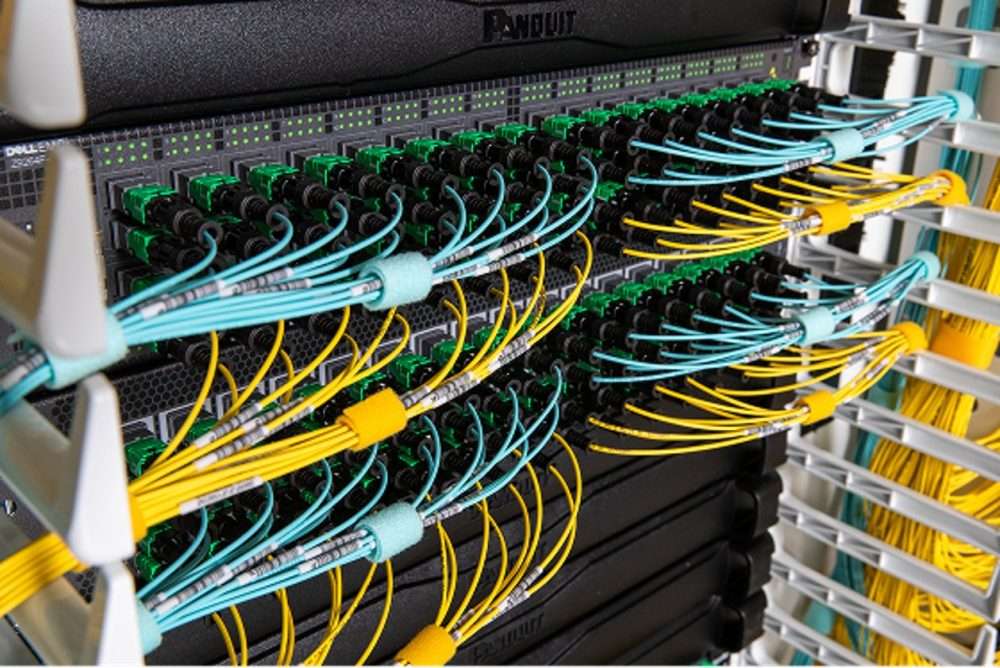
Why Fiber Optic Cable Is Important
Fiber optic cable is ideal for businesses that need reliable network performance across long distances.
Key Benefits of Fiber Optic Cable
- Supports long-distance connections
- Provides high-speed data transmission
- Reduces network downtime
- Supports 1G, 10G, 25G, 40G, 100G and higher speeds depending on equipment
- Works well for CCTV backbone links
- Ideal for connecting buildings and remote network points
- Less affected by electrical interference
- Suitable for offices, campuses, estates, hotels, schools, hospitals, factories, warehouses, and ISP networks
- More future-ready than copper cable for backbone links
Where Fiber Optic Cable Is Used
Fiber optic cable is commonly used for:
- Connecting two or more buildings
- CCTV backbone connections
- Internet distribution
- ISP links
- Server room and data center links
- Campus networks
- Hotels, schools, hospitals, and estates
- Warehouses and factories
- Connecting main cabinets to remote cabinets
- Connecting routers, firewalls, switches, and media converters
- Long-distance network connections above 100 meters
- High-speed uplinks between switches
Fiber Optic Cable vs Copper Network Cable
Copper network cable such as Cat6 or Cat6A is suitable for normal office data points within short distances. However, copper cabling is normally limited to about 100 meters for standard Ethernet connections.
Fiber optic cable is recommended where longer distance, better stability, and higher backbone performance are required.
| Feature | Copper Cat6/Cat6A | Fiber Optic Cable |
|---|---|---|
| Best for | Office data points | Long-distance backbone |
| Typical distance | Up to about 100 meters | Hundreds of meters to many kilometres |
| Speed | 1G/10G depending on cable | 1G, 10G, 25G, 40G, 100G+ depending on equipment |
| Interference | Can be affected by electrical noise | Less affected by electrical interference |
| Common use | Desks, printers, phones, cameras, APs | Buildings, cabinets, CCTV backbone, ISP links |
| Future expansion | Good for local points | Excellent for backbone links |
Main Types of Fiber Optic Cable
There are two main types of fiber optic cable:
- Single Mode Fiber
- Multimode Fiber
1. Single Mode Fiber Cable
Single Mode Fiber, also known as SMF, is mainly used for long-distance connections.
It is the most common recommendation for outdoor links, building-to-building connections, CCTV backbone links, ISP links, and enterprise network backbones.
Features of Single Mode Fiber
- Usually yellow in colour
- Common standard: OS2
- Common core size: 9/125 micron
- Suitable for long distances
- Ideal for outdoor and backbone installations
- Common for 1G and 10G long-distance links
- Supports future upgrades depending on SFP modules and equipment
Where Single Mode Fiber Is Recommended
- Connecting two buildings
- Campus networks
- CCTV backbone links
- Office-to-warehouse links
- School and hospital networks
- ISP and internet distribution links
- Remote cabinet connections
- Long-distance links above 100 meters
Typical Single Mode Distances
Depending on the SFP module, Single Mode Fiber can support:
- 1km
- 3km
- 10km
- 20km
- 40km
- 80km or more
Sales Recommendation
For most outdoor and long-distance business network projects, recommend:
Outdoor Armoured Single Mode Fiber Cable
2. Multimode Fiber Cable
Multimode Fiber, also known as MMF, is mainly used for shorter high-speed links.
It is common in server rooms, data centers, and short-distance rack-to-rack connections.
Features of Multimode Fiber
- Usually aqua, orange, violet, or lime green
- Common standards: OM1, OM2, OM3, OM4, OM5
- Suitable for short-distance high-speed links
- Common for server room and data center connections
- Often used for 10G short links
Common Multimode Types
| Type | Common Colour | Typical Use |
|---|---|---|
| OM1 | Orange | Older installations |
| OM2 | Orange | Older/medium-speed installations |
| OM3 | Aqua | 10G short-distance links |
| OM4 | Aqua or violet | Better 10G/40G/100G short-distance performance |
| OM5 | Lime green | Advanced high-speed data center use |
Sales Recommendation
Use OM3 or OM4 Multimode Fiber for short high-speed links inside server rooms, data centers, and rack-to-rack connections.
Single Mode vs Multimode Fiber
| Item | Single Mode Fiber | Multimode Fiber |
|---|---|---|
| Best for | Long distance | Short distance |
| Common colour | Yellow | Aqua/orange/violet |
| Common standard | OS2 | OM3/OM4 |
| Common use | Outdoor, backbone, CCTV, ISP, campus | Server room, data center, rack-to-rack |
| Distance | Long distance | Short distance |
| Recommended for outdoor | Yes | Not usually |
| Recommended for server room short links | Can work | Yes |
Indoor, Outdoor, Armoured, Aerial and Duct Fiber
Fiber optic cable is available in different designs depending on the installation environment.
Indoor Fiber Cable
Indoor fiber is used inside buildings, offices, risers, server rooms, cable trays, and network cabinets.
Outdoor Fiber Cable
Outdoor fiber is used outside buildings, between buildings, underground, through ducts, or overhead routes.
Armoured Fiber Cable
Armoured fiber has extra protection against rodents, pressure, accidental damage, and harsh outdoor conditions.
It is highly recommended for outdoor and underground installations.
Aerial Fiber Cable
Aerial fiber is used where fiber is installed overhead on poles. It may require messenger wire, clamps, and other pole installation accessories.
Duct Fiber Cable
Duct fiber is used where fiber is pulled through underground ducts, HDPE pipes, or existing conduits.
Recommended Position
For most outdoor projects in Kenya, the safer recommendation is:
Outdoor Armoured Single Mode Fiber Cable, subject to site survey and route confirmation.
Fiber Core Count Explained
Fiber optic cables come with different numbers of cores.
Common core counts include:
- 2 core fiber
- 4 core fiber
- 6 core fiber
- 8 core fiber
- 12 core fiber
- 24 core fiber
- 48 core fiber
- 96 core fiber and above
A normal duplex fiber link usually uses 2 cores:
- One core for transmit
- One core for receive
However, it is advisable to install extra cores for future expansion.
Example
If a client needs one link between two buildings, 2 cores may work. However, it is better to recommend 4-core, 6-core, or 12-core fiber depending on the project size.
Customer Explanation
Although your current connection may only need 2 cores, we recommend installing extra fiber cores so that future links can be added without pulling another cable.
Complete Fiber Optic Connection Flow
A proper fiber connection normally includes:
Router/Firewall + Switch + SFP Module + Fiber Patch Cord + ODF + Pigtails + Splicing + Main Fiber Cable + ODF + Patch Cord + SFP Module + Receiving Switch
Method 1: Router or Firewall to Switch to ODF to Fiber
This is a common professional setup.
The router or firewall controls internet and security. The switch distributes the network. The switch then connects to the fiber link using an SFP or SFP+ module.
Transmitting End
Internet / ISP
   ↓
Router / Firewall
   ↓
Core Switch or Managed Switch
   ↓
SFP / SFP+ Module
   ↓
Fiber Patch Cord
   ↓
ODF / LIU / Fiber Patch Panel
   ↓
Pigtail + Splice
   ↓
Main Fiber Cable
Receiving End
Main Fiber Cable
   ↓
Pigtail + Splice
   ↓
ODF / LIU / Fiber Patch Panel
   ↓
Fiber Patch Cord
   ↓
SFP / SFP+ Module
   ↓
Receiving Switch
   ↓
Access Points / CCTV Cameras / IP Phones / Computers / Remote Network
Full Connection Diagram
TRANSMITTING END                                      RECEIVING END
Internet / ISP
     │
Router / Firewall
     │
Core / Managed Switch                              Remote / Managed Switch
with SFP/SFP+ Port                                 with SFP/SFP+ Port
     │                                                    ▲
[SFP / SFP+ Module]                                [SFP / SFP+ Module]
     │                                                    ▲
Fiber Patch Cord                                   Fiber Patch Cord
     │                                                    ▲
ODF / LIU / Patch Panel  ── Main Fiber Cable ──  ODF / LIU / Patch Panel
     │                                                    ▲
Pigtail + Splice                                   Pigtail + Splice
Method 2: Router Directly to Fiber Using SFP
Some routers and firewalls have SFP or SFP+ ports. In this case, the router/firewall can connect directly to the fiber link.
Transmitting End
ISP / Internet
   ↓
Router / Firewall with SFP Port
   ↓
SFP / SFP+ Module
   ↓
Fiber Patch Cord
   ↓
ODF
   ↓
Main Fiber Cable
Receiving End
Main Fiber Cable
   ↓
ODF
   ↓
Fiber Patch Cord
   ↓
SFP / SFP+ Module
   ↓
Switch / Router / Firewall
   ↓
LAN Devices
Full Diagram
TRANSMITTING END                                      RECEIVING END
ISP / Internet
     │
Router / Firewall with SFP Port                    Switch / Router / Firewall
     │                                              with SFP Port
[SFP / SFP+ Module]                                [SFP / SFP+ Module]
     │                                                    ▲
Fiber Patch Cord                                   Fiber Patch Cord
     │                                                    ▲
ODF / Termination Box ─── Main Fiber Cable ─── ODF / Termination Box
Example Devices That May Have SFP/SFP+ Ports
- Ubiquiti UDM Pro / UDM SE
- MikroTik routers and switches
- Cisco routers and switches
- TP-Link Omada routers and switches
- Fortinet firewalls
- Sophos firewalls
- Enterprise core switches
Method 3: Switch-to-Switch Fiber Link Using SFP
This is one of the most common fiber optic network setups.
Simple Flow
Switch
→ SFP Module
→ Fiber Patch Cord
→ ODF
→ Main Fiber Cable
→ ODF
→ Fiber Patch Cord
→ SFP Module
→ Switch
Full Diagram
SENDING END                                      RECEIVING END
Network Switch                                  Network Switch
with SFP Port                                   with SFP Port
     │                                                ▲
[SFP Module]                                    [SFP Module]
     │                                                ▲
Fiber Patch Cord                               Fiber Patch Cord
     │                                                ▲
ODF / LIU  ───── Main Fiber Cable ─────       ODF / LIU
     │                                                ▲
Pigtail + Splice                               Pigtail + Splice
Best For
- Connecting buildings
- CCTV remote switch links
- Office-to-warehouse connections
- School or hospital campus networks
- Hotel block-to-block connections
- Remote department links
Method 4: Fiber Connection Using Media Converters
Media converters are used where existing routers or switches do not have SFP ports.
A media converter converts normal RJ45 Ethernet to fiber.
Transmitting End
Router / Firewall
   ↓
Switch RJ45 Port
   ↓
Cat6 Patch Cord
   ↓
Media Converter
   ↓
Fiber Patch Cord
   ↓
ODF
   ↓
Main Fiber Cable
Receiving End
Main Fiber Cable
   ↓
ODF
   ↓
Fiber Patch Cord
   ↓
Media Converter
   ↓
Cat6 Patch Cord
   ↓
Receiving Switch
   ↓
LAN Devices
Full Diagram
TRANSMITTING END                                      RECEIVING END
ISP / Internet
     │
Router / Firewall
     │
Network Switch RJ45 Port                         Network Switch RJ45 Port
     │                                                   ▲
Cat6 Patch Cord                                    Cat6 Patch Cord
     │                                                   ▲
Media Converter                                    Media Converter
     │                                                   ▲
Fiber Patch Cord                                   Fiber Patch Cord
     │                                                   ▲
ODF / Termination Box ─── Main Fiber Cable ─── ODF / Termination Box
Important Note
Media converters need power at both ends. Always confirm power availability before quoting.
Method 5: Router to Media Converter to Fiber
This method applies where the router has no SFP port and the customer wants to connect using fiber.
Connection Flow
Router RJ45 LAN Port
   ↓
Cat6 Patch Cord
   ↓
Media Converter
   ↓
Fiber Patch Cord
   ↓
ODF
   ↓
Main Fiber Cable
   ↓
ODF
   ↓
Fiber Patch Cord
   ↓
Media Converter
   ↓
Cat6 Patch Cord
   ↓
Switch / Router / Firewall
Best For
- Small office links
- Existing routers without SFP ports
- Budget-sensitive projects
- Simple point-to-point fiber links
- Temporary links where replacing switches is not preferred
Fiber Optic Cable for CCTV Backbone
Fiber is very useful in CCTV installations where cameras are far from the control room or where several remote camera zones must connect back to the main NVR.
CCTV Fiber Backbone Flow
CONTROL ROOM                                      REMOTE CAMERA AREA
NVR / Router / Main LAN
     │
Core Switch with SFP                         PoE Switch with SFP
     │                                             ▲
SFP Module                                   SFP Module
     │                                             ▲
Fiber Patch Cord                             Fiber Patch Cord
     │                                             ▲
ODF ───────────── Fiber Cable ───────────── ODF
                                                   │
                                                   ↓
                                             IP Cameras
CCTV Fiber Items May Include
- Outdoor armoured single mode fiber
- ODF or termination boxes
- SFP modules
- Fiber patch cords
- PoE switches with SFP uplink
- IP cameras
- NVR
- Cabinet or outdoor enclosure
- UPS/power backup
- Surge protection where required
- Splicing, testing, labeling, and commissioning
Fiber Optic Cable for Wi-Fi Access Points and Remote Wi-Fi Zones
Fiber can be used to connect remote Wi-Fi areas such as school blocks, hotel wings, outdoor Wi-Fi zones, warehouses, and estates.
Wi-Fi Fiber Backbone Flow
Router / Firewall
   ↓
Core Switch
   ↓
SFP Module
   ↓
ODF
   ↓
Fiber Cable
   ↓
ODF
   ↓
SFP Module
   ↓
PoE Switch
   ↓
Access Points
Common Use Cases
- School Wi-Fi blocks
- Hotel Wi-Fi coverage
- Hospital wings
- Apartment blocks
- Warehouse Wi-Fi
- Outdoor Wi-Fi zones
- Remote office sections
ISP, FTTH and GPON Fiber Connections
ISP and FTTH connections may use a different fiber setup from normal enterprise switch-to-switch fiber links.
Typical FTTH/GPON Setup
ISP Fiber
   ↓
FTTH Box / Fiber Faceplate
   ↓
SC/APC Patch Cord
   ↓
ONT / ONU
   ↓
Router
   ↓
Switch / Wi-Fi / LAN
Important Note
FTTH and GPON installations commonly use SC/APC green connectors, while many enterprise SFP links use LC/UPC blue connectors.
Always confirm whether the client needs:
- Enterprise fiber link
- ISP/FTTH connection
- GPON splitter solution
- ONT/ONU connection
- Fiber backbone between buildings
What Is an ODF?
ODF means Optical Distribution Frame.
It is used to terminate, organize, and protect fiber optic cable cores.
ODF may also be referred to as:
- Fiber patch panel
- LIU
- Fiber termination box
- Optical distribution box
Why ODF Is Important
The main fiber cable should not be connected directly to a switch, router, or media converter.
The professional method is:
Main Fiber Cable → ODF / Termination Box → Fiber Patch Cord → Active Equipment
Benefits of Using ODF
- Protects fiber splices
- Makes maintenance easier
- Keeps fiber cores organized
- Allows proper labeling
- Prevents damage to main fiber cable
- Supports future expansion
Pigtails, Couplers and Patch Cords Explained
Fiber Pigtail
A pigtail is a short fiber cable with a connector on one end and bare fiber on the other end.
It is spliced to the main fiber cable inside the ODF.
Main Fiber Core → Splice → Pigtail → Coupler → Patch Cord
Coupler / Adapter
A coupler joins the pigtail connector to the patch cord connector.
Fiber Patch Cord
A patch cord connects the ODF to active equipment such as:
- Switch SFP
- Router SFP
- Firewall SFP
- Media converter
- ONT/ONU
Fiber Connector Types
Common fiber connectors include:
| Connector | Common Use |
|---|---|
| LC | Most common for SFP and SFP+ modules |
| SC | Common on ODFs, media converters, FTTH and ISP links |
| ST | Older fiber installations |
| FC | Specialized installations |
Most Common for Networking
Most modern SFP and SFP+ modules use LC connectors.
Common patch cords include:
- LC-LC duplex patch cord
- LC-SC duplex patch cord
- SC-SC duplex patch cord
UPC vs APC Fiber Connectors
Fiber connectors also have polish types.
| Type | Common Colour | Common Use |
|---|---|---|
| UPC | Blue | Data networking, switches, routers, SFPs, media converters |
| APC | Green | FTTH, GPON and ISP optical networks |
Important Warning
Do not mix UPC and APC connectors unless confirmed by a technical person.
Before supplying patch cords, confirm whether the existing connection is blue UPC or green APC.
Simplex vs Duplex Fiber Patch Cords
Simplex Fiber
Simplex fiber uses one strand. It is common in BiDi SFP links and some FTTH/GPON applications.
Duplex Fiber
Duplex fiber uses two strands. It is the most common option for standard switch-to-switch SFP links.
One strand transmits and the other receives.
Sales Recommendation
For normal switch-to-switch or router-to-switch fiber links, quote duplex patch cords, unless the technical team confirms that BiDi/simplex is required.
SFP, SFP+, SFP28 and QSFP Modules Explained
An SFP module is a small transceiver inserted into a switch, router, or firewall to allow fiber connectivity.
| Module Type | Speed | Common Use |
|---|---|---|
| SFP | 1G | Standard Gigabit fiber uplinks |
| SFP+ | 10G | 10 Gigabit fiber uplinks |
| SFP28 | 25G | Advanced switching/data center |
| QSFP+ | 40G | High-capacity links |
| QSFP28 | 100G | Data center/high-end networks |
SFP Selection Checklist
Before quoting SFPs, confirm:
- Equipment brand
- SFP or SFP+ port type
- Required speed: 1G or 10G
- Fiber type: Single Mode or Multimode
- Distance: 300m, 550m, 10km, 20km, etc.
- Connector type: usually LC
- Wavelength
- Duplex or BiDi
- Brand compatibility
Media Converter vs SFP Switch Connection
| Option | Best Use | Advantage | Limitation |
|---|---|---|---|
| Switch/Router with SFP | Professional business networks | Cleaner, reliable, fewer devices | Requires SFP port |
| Media Converter | Existing RJ45-only switches | Lower-cost option | Needs power and adds extra device |
Recommended Position
Where possible, use switches, routers, or firewalls with SFP/SFP+ ports.
Use media converters when:
- Existing switch has no SFP port
- Customer has a limited budget
- Replacing switches is not possible
- The link is simple
- A temporary or basic fiber link is needed
Other Items Often Missed in Fiber Quotations
A complete fiber optic quotation may require more than cable.
Active Equipment
- Router
- Firewall
- Core switch
- Managed switch
- PoE switch
- SFP/SFP+ modules
- Media converters
- ONT/ONU where applicable
- NVR for CCTV projects
- Wireless controller or cloud key where required
Passive Fiber Accessories
- ODF / LIU
- Wall-mounted termination box
- Rack-mounted fiber patch panel
- Pigtails
- Couplers/adapters
- Patch cords
- Splice sleeves
- Splice tray
- Cable glands
- Fiber labels
- Dust caps
- Cable ties or Velcro
- Cable management panels
Installation Protection Materials
- HDPE pipe
- PVC conduit
- Flexible conduit
- GI pipe where required
- Trunking
- Cable tray
- Warning tape
- Pull rope
- Manholes or inspection chambers
- Draw boxes
- Pole clamps
- Suspension clamps
- Messenger wire
- Wall clips
- Saddles
- Duct accessories
Power and Cabinet Items
- Wall cabinet
- Floor-standing rack
- Outdoor waterproof cabinet
- PDU
- UPS
- Power extension
- Earthing kit
- Surge protection
- Fans or ventilation
- Lockable enclosure for remote switches or media converters
Services
- Site survey
- Route mapping
- Cable pulling
- Cable laying
- Trenching or civil works if needed
- Pole work if aerial
- Splicing
- Termination
- Testing
- Labeling
- Documentation
- As-built drawings for bigger projects
- Commissioning
- User handover
Fiber Testing and Commissioning
A professional fiber installation should be tested before handover.
Common Fiber Tests
| Test | Purpose |
|---|---|
| Visual fault locator test | Checks visible breaks or continuity problems |
| Optical power meter test | Confirms signal loss level |
| OTDR test | Shows distance, splice loss, breaks and link quality |
| Link test | Confirms switch/router link comes up |
| Speed test | Confirms performance where required |
| Label verification | Confirms correct core and port identification |
Sales Recommendation
For professional fiber projects, include:
Splicing, testing, labeling and commissioning
Sample Fiber Optic BOQ: Switch/SFP Link
| No. | Item | Qty | Notes |
|---|---|---|---|
| 1 | Outdoor Armoured Single Mode Fiber Cable | As per site | Main fiber link |
| 2 | ODF / LIU / Termination Box | 2 pcs | One at each end |
| 3 | LC/SC Pigtails | As required | For splicing |
| 4 | LC/SC Couplers | As required | For ODF connection |
| 5 | LC-LC or LC-SC Fiber Patch Cords | 2 pcs | ODF to SFP |
| 6 | Compatible SFP/SFP+ Modules | 2 pcs | One at each end |
| 7 | Managed Switch with SFP/SFP+ | As required | If not already available |
| 8 | Router / Firewall | As required | If part of scope |
| 9 | Wall/Floor Cabinet | As required | Housing equipment |
| 10 | UPS/PDU/Power Accessories | As required | Power backup |
| 11 | HDPE/Conduit/Trunking/Cable Tray | As required | Cable protection |
| 12 | Splice Sleeves and Accessories | As required | Fiber termination |
| 13 | Installation, Splicing and Testing | 1 lot | Service |
| 14 | Labeling and Commissioning | 1 lot | Handover |
Sample Fiber Optic BOQ: Media Converter Link
| No. | Item | Qty | Notes |
|---|---|---|---|
| 1 | Outdoor Armoured Single Mode Fiber Cable | As per site | Main link |
| 2 | ODF / Termination Box | 2 pcs | One at each end |
| 3 | Pigtails | As required | For splicing |
| 4 | Couplers / Adapters | As required | ODF interface |
| 5 | Fiber Patch Cords | 2 pcs | ODF to media converter |
| 6 | Media Converters | 2 pcs | One at each end |
| 7 | Cat6 Patch Cords | 2 pcs | Switch/router to media converter |
| 8 | Power Adapters | 2 pcs | Usually supplied with converters |
| 9 | UPS / Power Extension | As required | Powering equipment |
| 10 | Cabinet / Enclosure | As required | Equipment protection |
| 11 | HDPE / Conduit / Trunking | As required | Cable protection |
| 12 | Installation, Splicing and Testing | 1 lot | Service |
| 13 | Labeling and Commissioning | 1 lot | Handover |
Questions to Ask Before Quoting Fiber Optic Cable
Before preparing a fiber optic quotation, confirm:
- What are we connecting: router, firewall, switch, CCTV, Wi-Fi, server room, or ISP link?
- What is at the transmitting end?
- What is at the receiving end?
- What is the distance between the two points?
- Is the route indoor or outdoor?
- Is the route underground, overhead, through conduit, or through trunking?
- Are there existing ducts, poles, trays, or cabinets?
- Is the required speed 1G, 10G, or higher?
- Does the router, switch, or firewall have SFP/SFP+ ports?
- If there is no SFP port, should media converters be used?
- Is the fiber Single Mode or Multimode?
- How many cores are required now?
- How many spare cores should be allowed for future expansion?
- What connector is required: LC or SC?
- Is the connector UPC blue or APC green?
- Is power available at both ends?
- Is a UPS required?
- Is a cabinet or enclosure required?
- Is splicing and testing required?
- Is a site survey required before final pricing?
Common Fiber Optic Quotation Mistakes to Avoid
1. Quoting Only Fiber Cable
Fiber cable alone is not enough. A proper link may require ODFs, pigtails, patch cords, SFPs or media converters, splicing, and testing.
2. Forgetting the Router or Firewall
Many fiber links start from a router or firewall before going to a switch. Confirm the network design before quoting.
3. Forgetting SFP Compatibility
SFPs must match the device brand, speed, fiber type, distance, and connector type.
4. Using Media Converters Without Confirming Power
Media converters require power at both ends.
5. Wrong Connector Type
Always confirm LC, SC, UPC, or APC.
6. Wrong Fiber Type
Use Single Mode for long-distance and outdoor links. Use Multimode mainly for short server room or data center links.
7. Not Allowing Spare Cores
Always recommend spare fiber cores for future expansion.
8. No Site Survey
For outdoor, underground, aerial, or complex projects, pricing should be subject to site survey.
Recommended Fiber Optic Setup for Businesses
For most professional outdoor fiber projects, the recommended setup is:
Router / Firewall
   ↓
Core Managed Switch with SFP/SFP+
   ↓
Compatible SFP/SFP+ Module
   ↓
LC Fiber Patch Cord
   ↓
ODF / LIU
   ↓
Outdoor Armoured Single Mode Fiber
   ↓
ODF / LIU
   ↓
LC Fiber Patch Cord
   ↓
Compatible SFP/SFP+ Module
   ↓
Remote Managed / PoE Switch
   ↓
Users / Cameras / Access Points / IP Phones
For customers without SFP ports, the recommended setup is:
Router / Switch RJ45 Port
   ↓
Cat6 Patch Cord
   ↓
Media Converter
   ↓
Fiber Patch Cord
   ↓
ODF
   ↓
Outdoor Armoured Single Mode Fiber
   ↓
ODF
   ↓
Fiber Patch Cord
   ↓
Media Converter
   ↓
Cat6 Patch Cord
   ↓
Remote Switch
Why Choose Almiria Limited for Fiber Optic Cable Installation in Kenya?
Almiria Limited supplies and installs professional ICT infrastructure solutions for businesses in Kenya.
Our fiber optic solutions can support:
- Office network backbone links
- CCTV fiber backbone installations
- Internet distribution
- Wi-Fi access point backbone links
- Server room and data center fiber links
- Building-to-building connectivity
- Estate, school, hospital, and hotel networks
- Fiber termination, splicing, and testing
- Router, switch, firewall, and SFP supply
- Media converter solutions
We assist with product supply, installation, splicing, termination, testing, labeling, and commissioning.
Conclusion
Fiber optic cable is one of the best solutions for high-speed, long-distance, and reliable network connectivity. It is ideal for connecting buildings, CCTV networks, server rooms, remote switches, Wi-Fi zones, routers, firewalls, and business network backbones.
A proper fiber optic solution is not just cable. It includes:
Router/Firewall + Switch + SFP/Media Converter + Fiber Patch Cords + ODF + Pigtails + Fiber Cable + Splicing + Testing + Cabinet/Power + Documentation
For professional fiber optic cable supply and installation in Kenya, Almiria Limited can help you design, supply, install, splice, test, and commission a reliable fiber network solution for your business.
SEO Title
Fiber Optic Cable Installation in Kenya | Single Mode, Multimode, ODF, SFP & Splicing Services
Meta Description
Get professional fiber optic cable installation in Kenya from Almiria Limited for offices, CCTV, Wi-Fi, server rooms and building-to-building links. We supply and install Single Mode fiber, Multimode fiber, ODFs, SFP modules, media converters, splicing and testing solutions.
Suggested URL Slug
fiber-optic-cable-installation-kenya
Focus Keywords
fiber optic cable Kenya
fiber optic installation Kenya
fiber optic cable installation Kenya
fiber splicing Kenya
ODF installation Kenya
Single Mode fiber Kenya
Multimode fiber Kenya
fiber optic cabling Nairobi
CCTV fiber backbone Kenya
fiber optic network installation Kenya
SFP fiber connection Kenya
media converter fiber link Kenya
Almiria fiber optic installation
Suggested Tags
Fiber Optic Cable
Fiber Installation
Fiber Splicing
Single Mode Fiber
Multimode Fiber
ODF
SFP Modules
Media Converters
CCTV Fiber Backbone
Network Backbone
Fiber Patch Cords
Outdoor Armoured Fiber
Fiber Testing
Network Installation
Almiria Limited
Suggested Product/Service Categories
Networking
Fiber Optic Solutions
Structured Cabling
Network Installation
CCTV Installation
Wi-Fi Installation
Server Room Solutions
Data Cabling
ICT Infrastructure