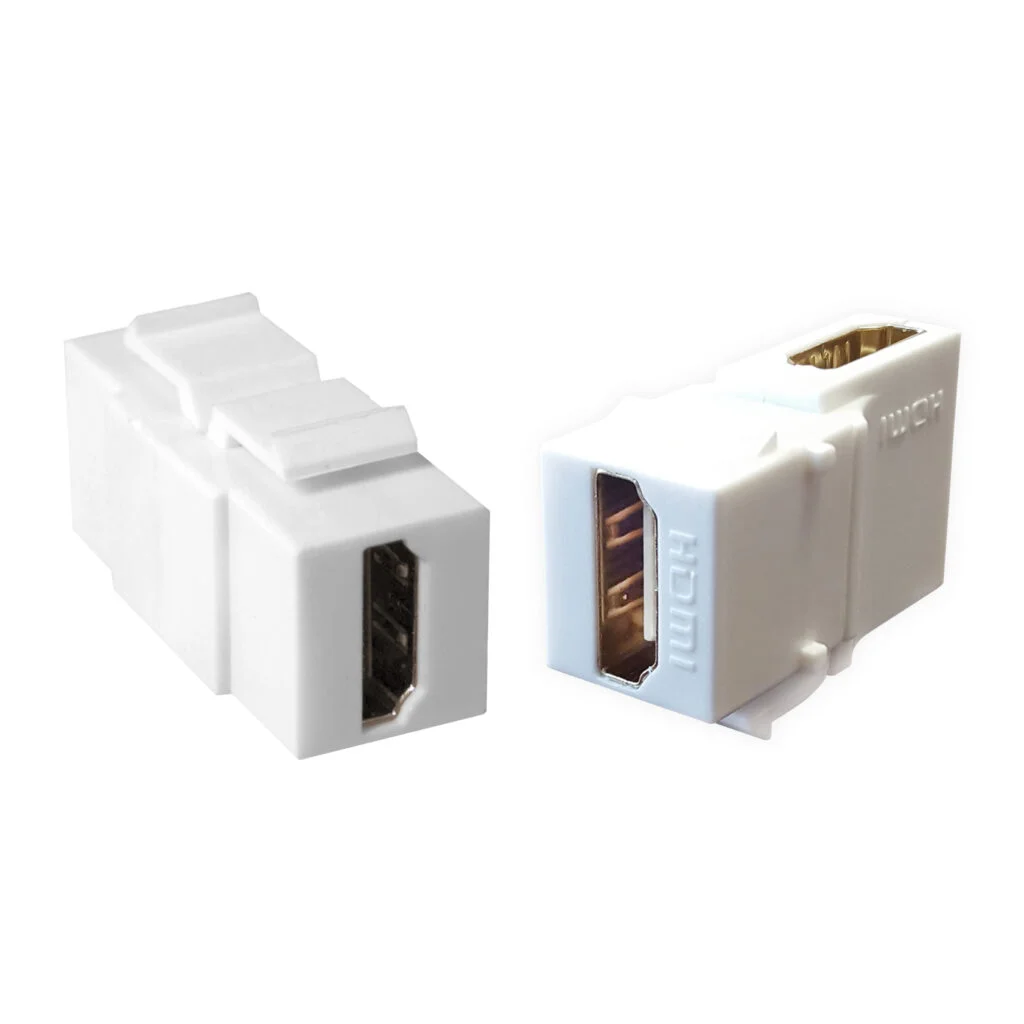
HDMI TO HDMI MODULE
KSh500.00 Excl. Tax
The HDMI TO HDMI MODULE provides a neat connection point for HDMI cables in compatible faceplates, wall outlets, panels, and desktop connection boxes. It uses female HDMI sockets to join a cable from the source side to another cable leading to the display.
Genuine product Secure checkout Warranty and order support Discounted Prices
HDMI TO HDMI MODULE
The HDMI TO HDMI MODULE provides a neat connection point for HDMI cables in compatible faceplates, wall outlets, panels, and desktop connection boxes. It uses female HDMI sockets to join a cable from the source side to another cable leading to the display. Therefore, it helps installers create clean and easy-to-manage audio and video connections in homes, offices, classrooms, meeting rooms, and other indoor AV installations.
Product Overview
This HDMI coupler module works as a passive feed-through connection. It joins two compatible HDMI cables without changing the signal format. As a result, it does not act as a video converter, signal booster, switch, splitter, or powered extender.
The module can sit inside a compatible modular faceplate or connection panel. Moreover, its compact design keeps cables behind the mounting surface. This setup creates a clean external connection point while protecting fixed cables from repeated handling.
Key Features
- Female-to-female connection: Joins two HDMI cables fitted with male connectors.
- Passive feed-through design: Passes compatible digital audio and video signals without active conversion.
- No external power: Operates without a power adapter or USB connection.
- Compact module format: Fits suitable modular faceplates, panels, and connection boxes.
- Plug-and-play use: Requires no drivers, software, or manual configuration.
- Audio and video support: Passes compatible HDMI sound and picture signals.
- Clean cable routing: Keeps fixed cables organised behind walls, panels, or furniture.
- Accessible connection point: Allows users to connect equipment without reaching hidden cables.
- Easy cable replacement: Lets installers replace the exposed cable without disturbing the fixed cable route.
- Flexible installation: Suits home entertainment, office, classroom, and meeting-room systems.
Suitable Applications
In a meeting room, the module can provide an accessible HDMI port near a conference table or presentation area. Therefore, users can connect a laptop to a fixed cable that runs toward a compatible projector or display. This arrangement reduces visible cable clutter and supports a tidy room layout.
Classrooms can also use the feed-through module near a teaching desk. For example, a fixed cable may run from the module to a wall-mounted projector. Teachers can then connect a source device using a short external HDMI cable.
In home entertainment areas, the AV wall module can hide part of an HDMI cable route behind furniture or within a suitable wall system. Consequently, the television area looks cleaner. However, installers should use cables approved for the chosen installation method and follow local building rules.
The module also suits desktop connection boxes and AV panels. In addition, technicians can use it to create a clear handover point between permanent cabling and frequently changed equipment cables.
Signal Performance and Compatibility
The complete HDMI connection includes the source device, first cable, module, second cable, and display. Therefore, every component affects the final signal quality. The required resolution, refresh rate, audio format, and control features must receive support across the complete connection path.
This passive module does not amplify or regenerate a weak signal. As a result, it cannot guarantee a fixed extension distance such as 50 metres. Longer cable runs may require an active HDMI extender or another suitable signal solution.
For the best results, use HDMI cables rated for the required video and audio format. Moreover, keep the total cable route as short as practical. Avoid sharp bends, crushed cables, loose plugs, and unnecessary connection points.
Installation Guidance
First, confirm that the module fits the intended faceplate, panel, or connection box. Next, connect the fixed HDMI cable to the rear female socket. Then, secure the module in its compatible mounting opening.
After installation, connect a suitable HDMI cable to the front socket. Finally, test the complete link with the intended source and display. If no image appears, check both cable connections and confirm that the equipment uses a supported input and output setting.
Always support the cable weight so it does not pull against the module. In addition, leave enough space behind the faceplate for the connector and cable bend. This approach helps prevent strain on the socket.
Technical Specifications
The HDMI TO HDMI MODULE provides the following confirmed product characteristics:
- Product type: Passive HDMI feed-through module
- Front connection: HDMI Type A female
- Rear connection: HDMI Type A female
- Connection format: Female to female
- Signal support: Compatible HDMI digital audio and video
- Signal conversion: Not supported
- Signal amplification: Not supported
- Power requirement: No external power
- Software requirement: No drivers required
- Installation type: Compatible modular faceplate, panel, or connection box
- Primary use: Joining two male-to-male HDMI cables
Resolution, bandwidth, audio format, and control-feature support depend on the module version and every connected component. Therefore, buyers should confirm the required performance before using it in a high-bandwidth installation.
Why Choose This HDMI Module?
The HDMI TO HDMI MODULE creates an organised connection point for compatible AV equipment. Moreover, its passive design keeps installation simple because it needs no power or software. It works well where installers need a clean HDMI outlet in a wall plate, panel, desk box, classroom, meeting room, or home entertainment area.
Frequently Asked Questions
Does this module extend HDMI signals by 50 metres?
No. It joins two HDMI cables but does not boost the signal. Therefore, long runs may require a suitable active extender.
Does it need a power supply?
No. The module uses a passive female-to-female connection and requires no external power.
Can it carry audio and video?
Yes. It can pass compatible HDMI audio and video signals. However, every cable and connected device must support the selected format.
Is it an HDMI splitter or switch?
No. The module provides one feed-through connection. It does not split one source between displays or switch between several sources.
Also Check:
Related products


HDMI Cables
HDMI Cables

HDMI Cables