
Safeguarding Your Home with HIkvision Cameras, Automated Gates, and More
Introduction
Ensuring the safety and security of your home is a top priority. In today’s rapidly evolving world, advanced technologies have made it possible to create comprehensive home security solutions that offer peace of mind and protection. In this ultimate guide, we will delve into the essential components of a robust home security system, with a special focus on HIkvision Cameras, automated sliding or swing gates, and other key security measures. Whether you’re a tech-savvy homeowner or new to the world of home security, this guide will equip you with the knowledge needed to safeguard your home and loved ones.
Inside This Guide…
- Understanding Home Security: A Holistic Approach
- The Importance of Home Security
- Components of a Comprehensive Security System
- How HIkvision Cameras and Automated Gates Fit In
- HIkvision Cameras: Eyes on Your Property
- Introduction to HIkvision Cameras
- Types of Surveillance Cameras
- Features to Look for in HIkvision Cameras
- Installation and Placement Tips
- Remote Monitoring and Smart Integration
- Automated Gates: Securing Your Entry Points
- Benefits of Automated Sliding or Swing Gates
- Types of Automated Gates
- Integration with Access Control Systems
- Installation and Maintenance Guidelines
- Synergy of Security: Integrating HIkvision Cameras and Automated Gates
- Advantages of Combining Cameras and Gates
- Creating a Unified Security Ecosystem
- Real-Life Scenarios and Success Stories
- Choosing the Right Home Security System: A Step-by-Step Guide
- Assessing Your Home’s Security Needs
- Factors to Consider When Selecting Cameras and Gates
- Budgeting and Cost Considerations
- Installation and Setup: Bringing Your Security System to Life
- DIY vs. Professional Installation
- Setting Up HIkvision Cameras
- Installing Automated Gates
- Remote Monitoring and Control: The Power of Smart Home Security
- Benefits of Remote Monitoring
- Connecting Cameras and Gates to Your Home Network
- Using Mobile Apps for Real-Time Surveillance
- Maintenance and Troubleshooting: Ensuring Long-Term Reliability
- Routine Maintenance for Cameras and Gates
- Common Issues and Troubleshooting Tips
- When to Seek Professional Assistance
- Customer Insights: Real Stories of Enhanced Home Security
- Testimonials from Homeowners Who Have Implemented Security Solutions
- How HIkvision Cameras and Automated Gates Have Made a Difference
1. Understanding Home Security: A Holistic Approach
In an age where technology has transformed the way we live, it has also revolutionized how we approach home security. Safeguarding your home goes beyond traditional locks and alarms—it involves a holistic and integrated strategy. This section introduces you to the fundamental concepts of home security and the components that come together to create a robust defense system. We’ll explore how HIkvision Cameras, automated gates, and other elements contribute to a comprehensive security solution.
The Importance of Home Security
Your home is more than just a physical space; it’s a sanctuary for your family and a repository of cherished possessions. Home security is not only about protecting your property from theft, but also about ensuring the safety and well-being of your loved ones. With advancements in technology, you now have access to sophisticated tools that allow you to monitor and control your home’s security remotely.
Components of a Comprehensive Security System
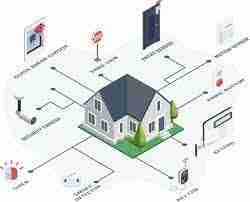
A well-rounded home security system is composed of several interlinked components, each serving a specific purpose. These components work in harmony to provide layers of protection:
- Surveillance Cameras: These devices capture visual data of your property and its surroundings, allowing you to monitor activities in real time and review footage if needed.
- Access Control Systems: Access control encompasses measures that regulate who can enter your property. This includes automated gates, smart locks, and keyless entry systems.
- Intrusion Detection Alarms: Alarms are triggered when unauthorized access is detected. They serve as a deterrent and alert homeowners or security personnel to potential threats.
- Environmental Sensors: These sensors detect changes in environmental conditions such as smoke, fire, carbon monoxide, and water leaks.
- Smart Home Integration: Connecting your security system to a smart home platform enables you to control and monitor various devices through a central hub or smartphone app.
How HIkvision Cameras and Automated Gates Fit In
HIkvision Cameras and automated gates are two essential components of a comprehensive home security system. HIkvision Cameras provide a visual layer of surveillance, capturing high-quality images and videos that can be accessed remotely. These cameras are equipped with advanced features such as night vision, motion detection, and even facial recognition technology.
Automated gates, on the other hand, secure your property’s entry points. Whether you opt for sliding or swing gates, automation adds an extra layer of control and convenience. These gates can be operated remotely, ensuring that only authorized individuals can access your property.
In the following sections of this guide, we will delve deeper into the specifics of HIkvision Cameras and automated gates, exploring their benefits, installation processes, and integration into a cohesive security ecosystem. By the end of this guide, you’ll be equipped with the knowledge to make informed decisions about the best security measures for your home.
2. HIkvision Cameras: Eyes on Your Property
Surveillance cameras have become a cornerstone of modern home security systems, providing a watchful eye over your property day and night. HIkvision Cameras, renowned for their cutting-edge technology and reliable performance, offer an unparalleled level of visual monitoring. In this section, we will explore the world of HIkvision Cameras, highlighting their various types, key features, including ColorVu technology, installation tips, and the role they play in your home’s security.
Introduction to HIkvision Cameras
HIkvision is a globally recognized leader in the field of surveillance technology. With a reputation for producing high-quality and innovative cameras, HIkvision has become a go-to choice for homeowners and businesses seeking reliable security solutions.
Types of Surveillance Cameras
HIkvision offers a diverse range of surveillance cameras designed to cater to different needs and scenarios:
- Dome Cameras: These cameras have a dome-shaped casing, making them less conspicuous and suitable for indoor use. They provide 360-degree coverage and are often used in retail settings.
- Bullet Cameras: Bullet cameras have a sleek, cylindrical design and are typically used for outdoor surveillance. They offer long-range visibility and are resistant to weather conditions.
- PTZ Cameras: Pan-Tilt-Zoom cameras can be remotely controlled to pan, tilt, and zoom in on specific areas. They are ideal for monitoring larger spaces and following moving subjects.
- Wireless Cameras: Wireless cameras eliminate the need for cumbersome wiring and offer flexibility in camera placement. They connect to your home network for remote viewing.
Features to Look for in HIkvision Cameras
When selecting HIkvision Cameras for your home security system, consider the following features:
- Resolution: Higher resolution cameras provide clearer and more detailed images. Look for options with HD or even 4K resolution.
- ColorVu Technology: HIkvision’s ColorVu technology enhances nighttime surveillance by providing vivid, full-color images, even in low-light conditions. This enables you to identify important details that traditional black and white images might miss.
- Night Vision: Infrared (IR) technology enables cameras to capture images in low-light or complete darkness, allowing for around-the-clock surveillance.
- Motion Detection: Cameras with motion detection capabilities can trigger alerts or recording when motion is detected within their field of view.
- Remote Access: Choose cameras that can be accessed and controlled remotely via a smartphone app or web interface.
- Cloud Storage: Some cameras offer cloud storage options, allowing you to store and access recorded footage online.
Installation and Placement Tips
Proper installation and strategic placement are crucial for maximizing the effectiveness of HIkvision Cameras:
- Location: Place cameras at entry points, high-traffic areas, and vulnerable spots such as windows and backyards.
- Height: Install cameras at a height that discourages tampering while providing a clear view of the area.
- Angle: Adjust the camera angle to cover the desired area without obstructions.
- Power Source: Ensure cameras have a reliable power source, either through electrical outlets or Power over Ethernet (PoE) connections.
- Network Connectivity: Connect cameras to your home network for remote access and monitoring.
By incorporating HIkvision Cameras, including ColorVu technology, into your home security system, you gain the ability to monitor and record activities in and around your property, deterring potential intruders and enhancing overall safety.
3. Automated Gates: Securing Your Entry Points
When it comes to home security, safeguarding your property begins at its entry points. Automated sliding or swing gates provide an effective and convenient way to control access, enhancing the overall security of your home. In this section, we will explore the benefits of automated gates, the different types available, their integration with access control systems, installation considerations, and maintenance guidelines.
Benefits of Automated Sliding or Swing Gates
Automated gates offer a range of advantages that contribute to your home’s security and convenience:
- Enhanced Security: Automated gates act as a physical barrier, preventing unauthorized entry and deterring potential intruders.
- Convenience: With the ability to open and close gates remotely, you can control access without leaving your home or vehicle.
- Curb Appeal: Automated gates add an aesthetic touch to your property, enhancing its visual appeal and value.
- Property Boundary: Gates clearly define the boundary of your property, reducing the risk of encroachments.
Types of Automated Gates
There are two primary types of automated gates: sliding gates and swing gates. Each type has its own unique characteristics and advantages:
- Sliding Gates: Sliding gates operate horizontally along a track. They are ideal for properties with limited space and offer smooth and quiet operation.
- Swing Gates: Swing gates open inward or outward like a door. They are suitable for properties with ample space and can be single or double leaf.
Integration with Access Control Systems
Automated gates can be seamlessly integrated with access control systems, enhancing their functionality:
- Keycard or Remote Access: Grant access to authorized individuals through keycards, remotes, or smartphone apps.
- Intercom Systems: Install intercom systems at the gate for communication with visitors before granting access.
- Video Intercoms: Video intercoms allow you to see and communicate with visitors visually before deciding to open the gate.
Installation and Maintenance Guidelines
Proper installation and regular maintenance are crucial for the optimal performance of automated gates:
- Professional Installation: While DIY installation is possible, professional installation ensures correct setup and adherence to safety standards.
- Gate Automation Kit: If retrofitting an existing gate, consider a gate automation kit that includes motor, controls, and safety features.
- Safety Measures: Install safety features such as obstacle detection sensors to prevent accidents.
- Routine Maintenance: Regularly inspect gates, hinges, motors, and control systems for wear and tear.
- Lubrication: Apply appropriate lubricants to hinges and moving parts to ensure smooth operation.
Automated gates provide an effective line of defense for your property’s entry points. By choosing the right type, integrating access control systems, and ensuring proper installation and maintenance, you can create a secure and convenient entry system that complements your overall home security strategy.
4. Synergy of Security: Integrating HIkvision Cameras and Automated Gates
An effective home security system operates as a cohesive unit, where different components work together seamlessly to provide comprehensive protection. In this section, we’ll explore the powerful synergy created by integrating HIkvision Cameras and automated gates into a unified security ecosystem. We’ll delve into the advantages of this integration, real-life scenarios, and success stories that showcase the enhanced security and peace of mind it can bring to your home.
Advantages of Combining Cameras and Gates
The integration of HIkvision Cameras and automated gates offers several compelling advantages:
- Enhanced Visual Surveillance: HIkvision Cameras provide real-time visual data of your property, allowing you to monitor activities and potential threats remotely.
- Access Control: Automated gates regulate entry points, ensuring that only authorized individuals can access your property.
- Event Correlation: By integrating cameras with gate access events, you can capture images or videos of individuals entering or exiting your property.
- Alerts and Notifications: Receive instant alerts and notifications on your smartphone or device when gate access is triggered, allowing you to respond promptly.
Creating a Unified Security Ecosystem
A well-integrated security ecosystem involves seamless communication and coordination between HIkvision Cameras, automated gates, and other security components:
- Smart Home Hub: A central hub or smart home platform can serve as the control center for your security system, allowing you to monitor and manage devices in one place.
- Rules and Automation: Set up automation rules that trigger specific actions based on events. For example, when a gate is accessed, cameras can start recording automatically.
- Remote Management: Access and control your security system remotely through a smartphone app or web interface.
Real-Life Scenarios and Success Stories
Consider the following scenarios that highlight the benefits of integrating HIkvision Cameras and automated gates:
- Package Delivery Monitoring: With integrated cameras and gates, you can remotely grant access to delivery personnel, monitor the delivery process, and ensure packages are securely received.
- Visitor Verification: Video intercoms connected to cameras allow you to visually verify visitors before granting access, enhancing security and convenience.
- Unauthorized Entry Detection: Receive instant alerts if an unauthorized individual attempts to breach your property, allowing you to take immediate action.
In a nutshell…
The integration of HIkvision Cameras and automated gates elevates your home security to a new level of sophistication and effectiveness. By leveraging the strengths of both components and creating a unified security ecosystem, you can enjoy enhanced protection, convenient access control, and greater peace of mind. As we continue through this guide, you’ll gain insights into selecting the right home security system, installation best practices, and tips for maintaining a secure and resilient environment for you and your family.
5. Choosing the Right Home Security System: A Step-by-Step Guide
Selecting the ideal home security system requires careful consideration of your property’s unique needs, your security priorities, and the available technologies. In this section, we’ll guide you through a step-by-step process to help you make informed decisions when choosing HIkvision Cameras, automated gates, and other security components for your home.
Assessing Your Home’s Security Needs
Begin by evaluating your home’s layout, vulnerabilities, and security objectives:
- Property Size: Consider the size of your property and the areas you want to monitor, both indoors and outdoors.
- Entry Points: Identify all entry points, such as doors, windows, and gates, that require surveillance or access control.
- High-Risk Areas: Determine areas that are particularly susceptible to intrusion or security breaches.
- Budget: Set a budget for your home security system, including cameras, gates, installation, and ongoing maintenance.
Factors to Consider When Selecting Cameras and Gates
As you explore HIkvision Cameras and automated gates, keep these factors in mind:
- Camera Types: Choose camera types that align with your monitoring needs, such as dome, bullet, PTZ, IP Cameras, or wireless cameras.
- Resolution: Opt for cameras with suitable resolution (HD, 4K) to capture clear and detailed images.
- Night Vision and ColorVu: Consider the need for night vision capabilities, including ColorVu technology for enhanced low-light imaging.
- Access Control Integration: If installing automated gates, ensure compatibility with your chosen access control systems.
- Remote Monitoring: Select cameras and gates that offer remote monitoring and control features via mobile apps or web interfaces.
Budgeting and Cost Considerations
Balancing your home security needs with your budget is essential:
- Total Cost: Calculate the total cost of cameras, gates, installation, and any additional accessories or services.
- Long-Term Expenses: Account for ongoing expenses such as maintenance, cloud storage, and software updates.
- DIY vs. Professional Installation: Decide whether to opt for DIY installation or professional installation services.
Moving Forward: Building Your Secure Home Environment
Selecting the right home security system is a crucial step toward creating a secure and protected living space. By carefully assessing your property’s needs, considering the features of HIkvision Cameras and automated gates, and budgeting wisely, you are well on your way to building a comprehensive security solution tailored to your requirements.
As we progress through this guide, we will delve into the practical aspects of installation and setup, ensuring that you have the knowledge and tools necessary to bring your chosen security components to life. With each step, you’ll gain the confidence to fortify your home against potential threats and enjoy the peace of mind that comes from knowing your loved ones and possessions are safeguarded.
The journey to achieving an ultimate home security system is an exciting one, filled with opportunities to customize and optimize your setup. Let’s continue onward, exploring the intricacies of installation, remote monitoring, and maintenance, as we work together to build a resilient and fortified home environment.
6. Installation and Setup: Bringing Your Security System to Life
With a clear understanding of your home security needs and the components you’ve chosen, it’s time to take the next step: installation and setup. In this section, we’ll guide you through the process of bringing your HIkvision Cameras, automated gates, and other security elements to life. Whether you’re embarking on a do-it-yourself project or enlisting professional help, this section will equip you with the knowledge needed to ensure a successful installation.
DIY vs. Professional Installation
Before you begin, consider whether you’ll tackle the installation yourself or hire professionals:
- DIY Installation: If you’re tech-savvy and comfortable with tools, DIY installation can be a cost-effective option. Ensure you follow manufacturer guidelines and safety precautions.
- Professional Installation: Enlisting professionals guarantees correct setup, optimal placement, and adherence to safety standards. It’s especially beneficial for complex installations.
Setting Up HIkvision Cameras
Installing HIkvision Cameras involves several key steps:
- Camera Placement: Strategically position cameras to cover entry points, high-traffic areas, and vulnerable spots.
- Mounting: Securely mount cameras on walls, ceilings, or other surfaces using appropriate hardware.
- Power and Connectivity: Ensure cameras have a stable power source and connect them to your home network, either through Wi-Fi or Ethernet.
- Configuration: Follow the manufacturer’s instructions to configure camera settings, such as resolution, motion detection, and remote access.
Installing Automated Gates
Setting up automated gates requires careful planning and execution:
- Gate Selection: Choose the type of gate that suits your property and access control needs—sliding or swing gates.
- Gate Motor: Consider reliable gate motor options like Centurion, a trusted brand known for its range of high-quality motors. Centurion offers various types of sliding and swing gate motors, each designed to provide smooth and secure gate operation.
- D-Series Sliding Gate Motors: These motors offer powerful and reliable automation for sliding gates, combining robustness with advanced features such as battery backup and speed control.
- Vantage Swing Gate Motors: Centurion’s Vantage range provides versatile automation solutions for swing gates, ensuring smooth and precise movement with adjustable speed settings.
- Access Control Integration: Connect the gate control system to your chosen access control methods, such as keycards or remotes.
- Safety Features: Install safety devices like obstacle detection sensors to prevent accidents and ensure compliance with safety regulations.
Testing and Troubleshooting
After installation, thorough testing and troubleshooting are essential:
- Functionality Check: Test each component’s functionality, including camera angles, gate opening and closing, and remote access.
- Software Setup: Configure any accompanying software or mobile apps for remote monitoring and control.
- System Integration: Ensure that integrated components, such as cameras and gates, communicate effectively within your security ecosystem.
Installation and setup mark a significant milestone in your journey to a secure home environment. Whether you choose the DIY route or seek professional assistance, proper installation ensures that your HIkvision Cameras, automated gates, and other security measures operate optimally. As you move forward, you’ll gain the confidence to not only secure your home, but also make the most of your security system’s features, ensuring your loved ones and belongings remain safe and protected.
7. Remote Monitoring and Control: The Power of Smart Home Security
In today’s connected world, the ability to monitor and control your home security system remotely is a game-changer. With HIkvision Cameras, automated gates, and other smart security components, you can stay informed and make real-time decisions from anywhere. In this section, we’ll explore the benefits of remote monitoring and control, how to connect your devices to your home network, and how to use mobile apps for seamless surveillance.
Benefits of Remote Monitoring
Remote monitoring empowers you with unparalleled control and awareness:
- Real-Time Updates: Receive instant alerts and notifications on your smartphone or device for events such as gate access, motion detection, and security breaches.
- Visual Verification: View live or recorded camera footage to visually confirm activities and events on your property.
- Access Control on the Go: Open and close automated gates remotely, allowing access for authorized individuals even when you’re not at home.
- Peace of Mind: Whether you’re at work, traveling, or simply away from home, remote monitoring provides peace of mind by keeping you connected to your security system.
Connecting Cameras and Gates to Your Home Network
To enable remote monitoring, you’ll need to connect your HIkvision Cameras and automated gates to your home network:
- Wi-Fi Connection: For wireless cameras and devices, connect to your home Wi-Fi network through the camera’s settings.
- Ethernet (PoE): If using Ethernet cables, ensure Power over Ethernet (PoE) support for both power and data transmission.
- Gate Control Hub: Many gate control systems have their own network connectivity methods—follow the manufacturer’s instructions for connection.
Using Mobile Apps for Real-Time Surveillance
Mobile apps provide a user-friendly interface for remote surveillance and control:
- App Installation: Download and install the corresponding mobile app for your HIkvision Cameras, gate control system, and any integrated components.
- Remote Access Setup: Follow the app’s setup process to link your devices to your account and establish remote access.
- Live Viewing: Access live camera feeds and gate status information directly from your smartphone or tablet.
- Notifications and Alerts: Configure notification settings to receive alerts for specific events, such as motion detection or gate access.
Secure Remote Access Practices
Ensure secure remote access by following these best practices:
- Strong Passwords: Use strong, unique passwords for each device and app account to prevent unauthorized access.
- Two-Factor Authentication: Enable two-factor authentication for an extra layer of security when logging in.
- Network Security: Keep your home Wi-Fi network secure with a strong password and regular firmware updates.
- Regular Monitoring: Periodically check your mobile app for updates, alerts, and camera views to stay connected and informed.
Remote monitoring and control empowers you with the ability to oversee your home security system anytime, anywhere. By connecting your HIkvision Cameras, automated gates, and other smart security components to your home network and utilizing mobile apps, you extend your protective reach and maintain a vigilant watch over your property. As we move forward, you’ll discover insights into maintaining the long-term reliability of your security system, troubleshooting common issues, and seeking professional assistance when needed.
8. Maintenance and Care: Sustaining a Secure Environment
Maintaining the effectiveness and reliability of your home security system requires ongoing care and attention. In this section, we’ll delve into the importance of regular maintenance for your HIkvision Cameras, automated gates, and other security components. By following maintenance guidelines and adopting proactive measures, you can ensure that your security system continues to operate optimally, providing unwavering protection for your home.
Regular Maintenance Routine
Establishing a routine for maintaining your security system is essential:
- Camera Inspections: Periodically inspect cameras for signs of physical damage, misalignment, or obstruction of the lens.
- Cleaning: Keep camera lenses clean from dirt, dust, and debris that can affect image quality.
- Motor Check: Regularly test the functionality of gate motors, ensuring smooth and responsive operation.
- Lubrication: Apply recommended lubricants to gate hinges and moving parts to prevent friction and ensure smooth movement.
Firmware and Software Updates
Stay current with firmware and software updates:
- Camera Updates: Regularly check for and install firmware updates provided by HIkvision to enhance camera performance and security.
- Gate Control System: Update gate control software to access new features and ensure compatibility with other components.
Battery Maintenance
If your security system includes battery-powered components, take care of their batteries:
- Backup Power: Ensure that battery backups for gate motors and cameras are functioning properly in case of power outages.
- Replacement: Replace batteries as needed to prevent device malfunction.
Surveillance Footage Management
Manage and maintain recorded surveillance footage:
- Storage: Regularly back up and manage stored footage to prevent overloading storage devices.
- Cloud Storage: If using cloud storage, monitor available space and consider expanding storage if necessary.
Seasonal Considerations
Adapt your maintenance routine to seasonal changes:
- Weatherproofing: Prepare cameras and gate components for changing weather conditions to prevent damage.
- Snow and Ice: Clear snow and ice from camera lenses and gate tracks to ensure proper functionality.
Professional Assistance
If you encounter issues beyond your expertise, seek professional assistance:
- Camera Calibration: Engage professionals to recalibrate camera settings for optimal performance.
- Gate Maintenance: Consult experts for in-depth maintenance, repairs, and adjustments of gate motors and components.
Maintenance is the key to sustaining the longevity and effectiveness of your HIkvision Cameras, automated gates, and overall security system. By establishing a regular maintenance routine, staying updated with firmware and software, and addressing issues promptly, you ensure that your investment in home security continues to provide the protection and peace of mind you and your family deserve.
In the final section of this guide, we’ll wrap up our comprehensive exploration of home security by highlighting the importance of continuous improvement and staying vigilant in an ever-evolving security landscape.
9. Staying Vigilant: Embracing Continuous Improvement
As the world of technology and security evolves, so should your approach to home security. In this final section, we’ll emphasize the importance of staying vigilant and embracing continuous improvement to ensure the ongoing effectiveness of your HIkvision Cameras, automated gates, and smart security components.
Keeping Up with Technological Advances
- Research and Education: Stay informed about the latest advancements in home security technology through research, online resources, and industry news.
- Upgrade Opportunities: Regularly assess your security system and consider upgrading components or adding new features to stay ahead of potential threats.
Security Awareness and Training
- User Education: Educate all household members about the security system’s features, usage, and best practices.
- Regular Drills: Conduct periodic security drills and practice scenarios to ensure everyone knows how to respond in emergencies.
Neighborhood Collaboration
- Community Watch: Participate in or establish a neighborhood watch program to collaborate with neighbors and share security information.
- Shared Resources: Coordinate with neighbors to create a network of surveillance cameras and security measures that cover a wider area.
Engaging Professional Services
- Security Audits: Periodically engage professionals to conduct security audits and assessments to identify vulnerabilities.
- Consult Experts: Consult security experts for guidance on system enhancements, upgrades, and industry best practices.
Feedback and Adaptation
- User Feedback: Encourage family members to provide feedback on the security system’s usability and any issues they encounter.
- Adapt to Change: Modify your security strategies based on feedback, emerging threats, and changes in your property or lifestyle.
Your journey to a secure and protected home doesn’t end with the installation of HIkvision Cameras, automated gates, and smart security components. Instead, it marks the beginning of a continuous process of improvement and adaptation.
By staying vigilant, embracing new technologies, fostering security awareness, and collaborating with your community and professionals, you create a resilient and effective home security ecosystem that evolves with your needs.
Conclusion
Securing your home goes beyond locking doors and windows—it requires a comprehensive approach that leverages advanced technologies to create a protective shield around your property. By incorporating HIkvision Cameras, automated sliding or swing gates, and other security measures, you can enjoy the peace of mind that comes with knowing your loved ones and belongings are safe.
This ultimate guide has provided you with the knowledge and tools needed to take proactive steps toward creating a secure and smart home environment. As you embark on this journey, remember that investing in home security is an investment in the well-being of your family and the protection of your most valuable asset